















Key takeaways:
-
- Chatbot development cost ranges from $8,000 for a basic rule-based bot to $30,000+ for AI-powered, multi-platform, enterprise-grade solutions.
- Chatbots are created by combining artificial intelligence, machine learning, and NLP to simulate human-like conversations.
- To create a chatbot, you need structured dialogues, fallback messages, and logical decision paths. Keep conversations simple, clear, and goal-driven.
- Chatbots track user preferences, past interactions, and behavior patterns. They offer tailored recommendations, personalized offers, and relevant content.
Ever wished you could have an intelligent AI assistant friend like J.A.R.V.I.S from Iron Man? Yeah, we get you! Having a smart digital companion that answers instantly, manages tasks effortlessly, cracks witty responses, and feels almost human is a dream. Or not? Because chatbots today are already doing exactly that!
Even these chatbots are an integral part of modern industries to tackle customer problems in no time. But when the customer queries get delayed or unresponded to, it can cost a business many valuable leads for revenue.
Are you also wondering how to create a chatbot from scratch and automate customer service? Well, you need the right approach to help you automate up to 70% of customer interactions. It also engages users 24/7 and significantly reduces operational costs.
This blog provides a detailed insight into how to develop a chatbot from scratch. We will cover the development steps, essential features, benefits, cost factors, and monetization strategies. So, let’s dive straight into it!
What is a Chatbot? Types, Use Cases & Why Businesses Build Their Own
A chatbot is a software application designed to interact with users through text or voice commands. Chatbots use AI and NLP (Natural Language Processing) to understand users’ intent.
Chatbots offer 24/7 automated assistance, improving customer service efficiency by answering queries, providing assistance, and automating routine tasks. There are three major types of chatbots: Rule-Based, AI-Powered (Conversational), and Voicebots:

Chatbot Market Overview: Why 2026 Is the Right Time to Build Your Own Chatbot
- The global chatbot market size is estimated to grow from USD 7.65 billion in 2025 to USD 40.37 billion by 2033, at a CAGR of 23.10% over the forecast period (2025–2033).
- North America dominated the global market with a market share of 38.93%.
- By type, the standalone segment dominated the market, accounting for 53.34% share.
- By business model, the bot-for-service segment dominated the market and is estimated to grow at a CAGR of 23.04%.
- Based on end-user, the large-enterprise segment dominates the market, with a revenue share of 50.63%.
How Does a Chatbot Work? A Non-Technical Breakdown for Business Owners
AI development company in USA creates modern chatbots by combining artificial intelligence, machine learning, and NLP to simulate human-like conversations. Here’s a simple breakdown of how chatbot software works:
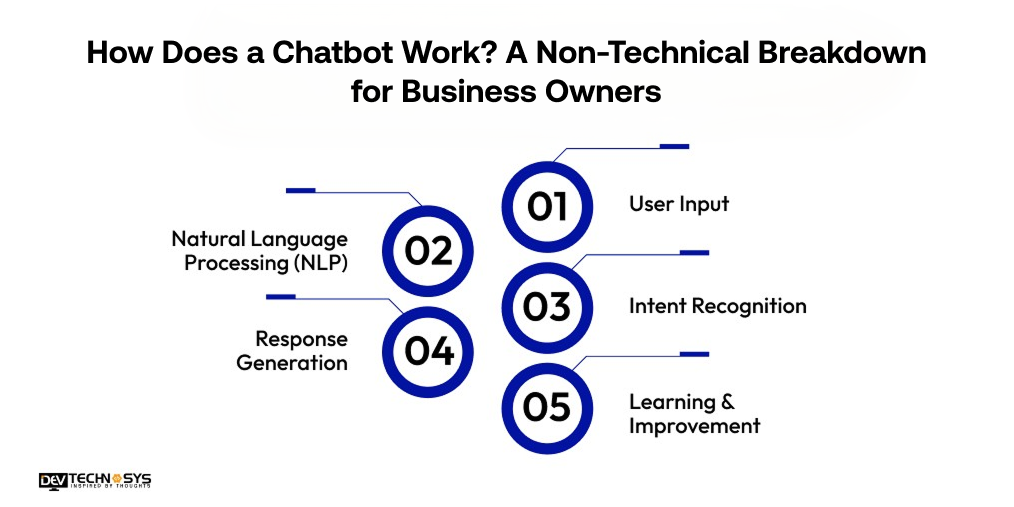
1. User Input:
The process starts when a user sends a message or gives a voice command. This input can come from a website, mobile app, or messaging platform. The chatbot captures the message and prepares it for analysis.
2. Natural Language Processing (NLP):
The Natural Language Processing (NLP) chatbot analyzes the text using NLP. It identifies keywords, intent, context, and user sentiment to understand what the user actually means.
3. Intent Recognition:
Once the message is received, the chatbot identifies the user’s intent. It determines what the user wants to accomplish, such as booking a ticket, tracking an order, or asking a question.
4. Response Generation:
The chatbot selects or generates the most relevant response. Rule-based bots follow predefined scripts. AI-powered bots create dynamic replies using trained models.
5. Learning & Improvement:
Advanced chatbots use machine learning to improve over time. They learn from interactions, feedback, and new data to deliver more accurate and personalized responses.
Top 10 AI Chatbots in 2026 — Competitive Benchmarks to Inform Your Own Build
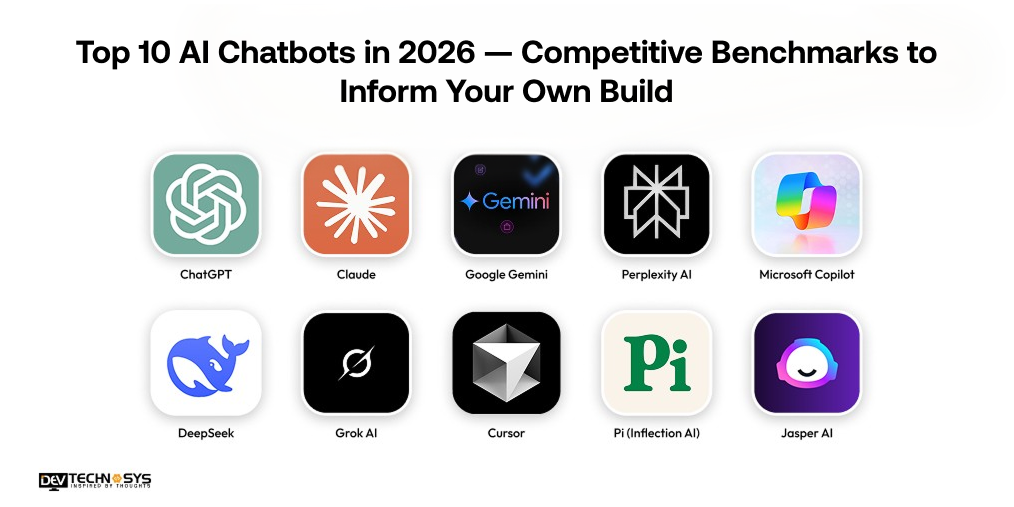
In 2026, several AI chatbots stand out for their innovation, accuracy, and real-world impact. Now before we explain how to create a chatbot, let’s check out the top 10 chatbot picks leading the AI conversation revolution this year.
Chatbot |
Launch Year |
Avg. Rating (2026) |
Platform Availability |
| ChatGPT | 2022 | 4.7/5 | Web, iOS, Android, API |
| Claude | 2023 | 4.6/5 | Web, iOS, Enterprise API |
| Google Gemini | 2023 | 4.5/5 | Web, Android, iOS, Google Workspace |
| Perplexity AI | 2022 | 4.6/5 | Web, iOS, Android |
| Microsoft Copilot | 2023 | 4.4/5 | Windows, Web, Microsoft 365, Mobile |
| DeepSeek | 2023 | 4.3/5 | Web, iOS, Android |
| Grok AI (xAI) | 2023 | 4.2/5 | Web, iOS, Android, X Platform |
| Cursor | 2024 | 4.5/5 | Web, VS Code, Developer Tools |
| Pi (Inflection AI) | 2023 | 4.4/5 | Web, iOS, Android |
| Jasper AI | 2021 | 4.5/5 | Web, API |
1. ChatGPT
OpenAI’s ChatGPT is one of the most widely used AI chatbots worldwide. It helps with writing, coding, research, and brainstorming. It supports text, images, and voice.
Businesses and individuals use it for productivity, creativity, and customer engagement. GPT-based chatbot development allows intelligent, context-aware interactions for various applications.
Industry Insights:
According to Digital Gravity, As of early 2026, ChatGPT leads the AI market with 60-64% share, boasting 700 million+ weekly active users and over 10 million paid subscribers.
2. Google Gemini
Google created Google Gemini as a multimodal AI assistant. It integrates deeply with Gmail, Docs, and Android. Users rely on it for search, summaries, and productivity tasks. Gemini combines real-time web access with smart contextual understanding.
The AI-powered chatbot development like Google Gemini involves training massive datasets, building scalable cloud infrastructure, integrating APIs, and continuously optimizing performance to deliver multiple platforms and devices.
3. Jasper AI
Jasper offers Jasper AI for marketing and branded content creation. It helps businesses generate blogs, ads, and social posts. Teams use it to maintain brand voice. Jasper focuses on conversion-driven and SEO-optimized content strategies. If you wish to create a chatbot like Jasper AI, then contact a chatbot development services provider.
4. Perplexity AI
Perplexity AI is designed as an AI-powered answer engine. It provides responses with cited sources. Researchers and students use it for reliable information discovery.
The AI-powered chatbot development like perplexity AI involves blending conversational AI with real-time web search for accurate, transparent results.
5. Claude
Anthropic developed Claude with a strong focus on safety and reasoning. It is popular for long-form writing and document analysis. Many enterprises prefer it for structured workflows.
Claude delivers thoughtful, balanced, and context-aware responses. If you want to develop an AI chatbot for ecommerce like Claude, then contact a top AI chatbot sevelopment company in USA.
Industry Insights:
Business of Apps states that claude reached approximately 19 million monthly active users by Q3 2025, with around 176 million monthly website visits in December 2025.
Build a Chatbot from Scratch vs. Use a No-Code Platform — Which is Right for Your Business?
The selection between creating a chatbot from scratch or using a no-code platform is mandatory. It is not only a technical question but also involves costs, scalability, and time-to-market. By building a chatbot from scratch, you can get full control over development.
Whereas no-code chatbot platforms can be launched immediately with less effort. Here we have explained a comparison between these that helps you make informed decisions to create your own chatbot.
Factor |
Build from Scratch |
No-Code Platform |
| Development Time | Long (weeks to months) | Fast (hours to days) |
| Cost | High initial investment | Low to moderate subscription-based |
| Customization | Full control and flexibility | Limited to platform capabilities |
| Technical Skills | Requires developers & AI expertise | No coding required |
| Scalability | Highly scalable with custom architecture | May have limitations at scale |
| Integration | Fully customizable integrations | Pre-built integrations only |
| Maintenance | Requires ongoing technical support | Managed by a platform provider |
| Best For | Enterprises, complex use cases | Startups, SMEs, quick deployment |
Want a chatbot demo or pricing? Fill the form and talk to our experts today.
Pick what you need below — you can select more than one — then tap Get detail to continue.
-
Chatbot demo dashboard
-
Cost to develop an app
-
Industry report
-
Case study
How to Build a Chatbot from Scratch: 8 Developer-Proven Steps (2026 Guide)
Wondering how to create an AI chatbot from scratch? To create a chatbot from scratch, you need to combine strategy, design, and technology. By following this AI chatbot development guide, businesses can build AI assistants that engage users, automate tasks, and deliver seamless, personalized experiences efficiently.
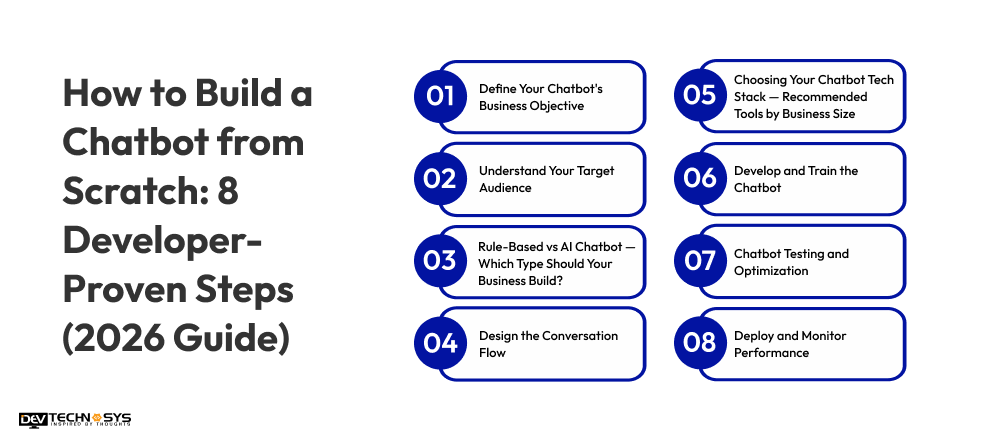
1. Define Your Chatbot’s Business Objective
The step in our chatbot development for beginners begins by clearly defining the main purpose of your chatbot and the problem it aims to solve. To create a chatbot, you need to determine whether it will handle customer support, automate internal processes, capture leads, or provide instant information.
A clearly defined objective guides feature planning, tone of communication, integrations, and long-term development decisions effectively.
2. Understand Your Target Audience
The next step to create a chatbot is identifying and analyze the users who will interact with your chatbot regularly. Study their behavior, preferences, communication style, and expectations.
Understanding your audience helps you design conversations that feel natural and relevant. A user-focused chatbot improves engagement levels, builds trust, and delivers a more satisfying experience.
3. Rule-Based vs AI Chatbot – Which Type Should Your Business Build?
Experts who provide AI chatbot development services in America first needs to decide whether a rule-based or AI-powered chatbot suits your business needs. Rule-based bots operate using fixed scripts and predefined responses.
AI chatbots use NLP and machine learning for contextual, dynamic replies. Your choice should reflect project complexity, scalability goals, available budget, and required personalization level.
Industry Insights:
According to PM Insights, Jasper’s 2026 report reveals 91% AI adoption among marketers, with 41% proving ROI, while 63% report intermediate or advanced AI maturity
4. Design the Conversation Flow
Hire dedicated developers in California to carefully map user journeys and possible interaction scenarios. To create a chatbot, you need structured dialogues, fallback messages, and logical decision paths.
Keep conversations simple, clear, and goal-driven. A well-designed conversation flow reduces confusion, improves response accuracy, and ensures users can complete tasks quickly and smoothly.
5. Choosing Your Chatbot Tech Stack — Recommended Tools by Business Size
For custom chatbot development, choose programming languages, development frameworks, and AI tools that match your project requirements. Options like Python, JavaScript, and NLP libraries are commonly used.
Your technology stack should support scalability, seamless integrations, strong security, and future enhancements without creating unnecessary technical limitations.
Layer |
Common Technologies |
| Chatbot Frontend Development | React.js, Angular, Flutter |
| Chatbot backend development | Node.js, Django, Express.js |
| Programming Language | Python, JavaScript |
| AI / NLP | TensorFlow, PyTorch, Rasa, spaCy |
| Database | MongoDB, MySQL, PostgreSQL |
| Cloud Hosting | AWS, Google Cloud, Azure |
| Chatbot API integration | REST APIs, CRM APIs, Payment Gateways |
| Security | SSL, OAuth 2.0, JWT |
6. Develop and Train the Chatbot
Once your website is created, it’s time for your mobile app development company in USA to ensure it works. Build the chatbot’s backend logic and connect it with required APIs or databases.
For AI-driven bots, train the model using relevant datasets to improve intent detection and contextual understanding. Continuous training and refinement enhance response accuracy, personalization, adaptability, and overall conversational intelligence.
7. Chatbot Testing and Optimization
Conversational AI development experts conduct thorough testing before deployment to identify technical errors, broken flows, and inaccurate responses. Test across devices, browsers, and operating systems to ensure consistency.
Optimization based on feedback and analytics improves speed, reliability, usability, and overall user satisfaction significantly. The types of testing involves:
- Unit Testing: Validates individual functions or modules to ensure they work properly.
- Integration Testing: Checks that components like NLU, backend, and APIs interact smoothly.
- Usability Testing: Observes real users to identify confusing flows or friction points.
- Load Testing: Tests performance under heavy traffic to prevent crashes or slowdowns.
- Regression Testing: Confirms updates do not break existing features.
- Monitoring & Analytics: Track errors, fallback rates, and response accuracy to optimize performance continuously.
8. Deploy and Monitor Performance
Your AI agent development company in NYC will then launch the chatbot on your chosen platforms, such as websites, mobile apps, or messaging channels.
Monitor performance metrics including engagement rate, response time, and user feedback. Monitoring tools help track your chatbot’s performance and improve user experience. Key metrics to track include:
- Usage Statistics & Engagement: Measure how often users interact with the bot and how long conversations last.
- Popular Queries & Intents: Identify common questions and topics to optimize responses.
- Fallback & Failure Rates: Track when the bot fails to understand users or provides incorrect responses.
- User Satisfaction Scores: Gather feedback and ratings to measure satisfaction and guide improvements.
Continuous updates, performance tracking, and feature improvements keep your chatbot efficient, competitive, and aligned with evolving business goals.
Chatbot Development Checklist: 20 Things to Verify Before You Launch
Developing a chatbot if you don’t have proper validation can lead to bad results. It can be a reason for bad user experience, missed opportunities, and a waste of investment.
So, before you build a chatbot, here is a checklist you have to verify. This list will help you engage users, solve problems, bring efficiency in responses, and get desired results.
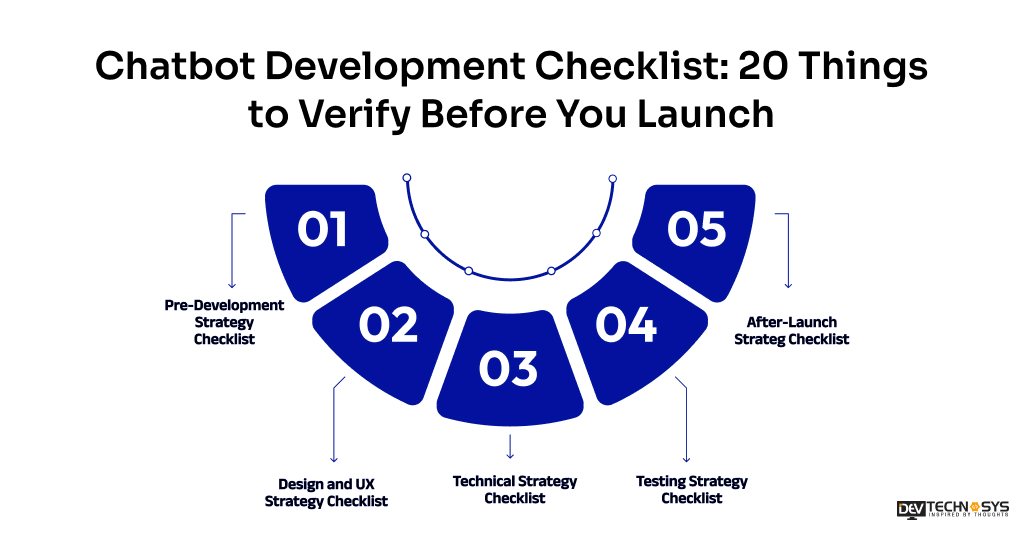
1. Pre-Development Strategy Checklist
- Make sure your business objectives align with your chatbot.
- Mapping user intent, target audience, and use cases
- Seamless integration of Chatbot with CRM, APIs, and third-party tools
- Select one between a custom development or a no-code platform approach
- Decide on a budget, timeline, and select an ideal technology stack
2. Design and UX Strategy Checklist
- Chatbot interaction should be human-like and conversational
- For an amazing user interaction, make an intuitive design
- Add personalization as per user behavior and choices
- Chatbot should reach worldwide with multilingual support
3. Technical Strategy Checklist
- To recognize user intent properly, NLP should be developed
- Backend systems and databases are needed in a chatbot
- Fast responses and real-time data processing
- Strong data security and privacy compliance measures
- The architecture should be scalable enough to handle large traffic
4. Testing Strategy Checklist
- Ensure response accuracy with fewer errors and disruptions
- Test performance on multiple devices and platforms
- Validate all conversation flows and fallback responses
- Performance should be tested under high traffic
5. After-Launch Strateg Checklist
- Monitor chatbot performance using analytics and user feedback
- Continuously improve conversations, features, and engagement

Types of Chatbots Explained: A Complete Guide for Businesses
Chatbots are classified into multiple systems. These include rule-based, AI-powered, generative AI, voice assistants, and others. They are essential for automated customer support, sales, and lead generation. In this section, we will explain these types so businesses are clear about what they want to choose.
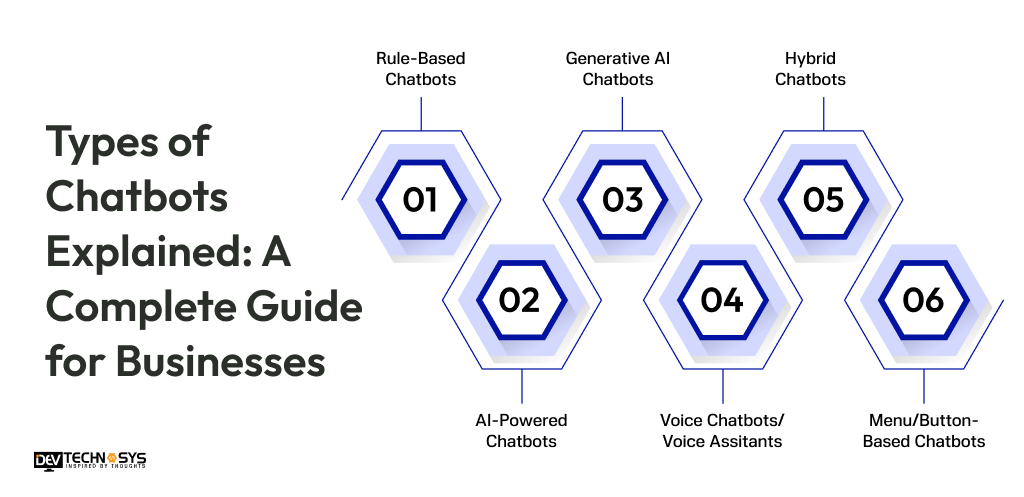
1. Rule-Based Chatbots
By its name, it is understood that rule-based chatbots work on predefined rules and scripts. They only respond to some particular keywords or menu sections. Rule-based chatbots are ideal for handling simple, repetitive queries.
2. AI-Powered Chatbots
AI-powered chatbots usually operate on ML and NLP to understand user intent clearly. They simply learn from user interactions and can handle complex queries. AI-powered chatbots can provide more accurate and user-focused responses.
3. Generative AI Chatbots
Generative AI Chatbots are known for offering human-like responses in real-time. For this, the chatbot uses advanced artificial intelligence models for an engaging user experience. They communicate freely, generate content, and adapt to human responses.
4. Voice Chatbots/Voice Assitants
Voice chatbots or assistants interact with users through spoken language rather than text. They use speech recognition and voice synthesis to understand user commands and respond. A voice assistant is commonly used in smart devices.
5. Hybrid Chatbots
Hybrid chatbots are a combination of AI capabilities with rule-based logics. They are generally preferred to manage simple queries with already set rules and flows. Hybrid chatbots are offering a balance of efficiency and flexibility.
6. Menu/Button-Based Chatbots
Menu or button-based chatbots guide users through options using clickable buttons. They are easy to use, reduce input errors, and work well for structured interactions like booking services or navigating support options.
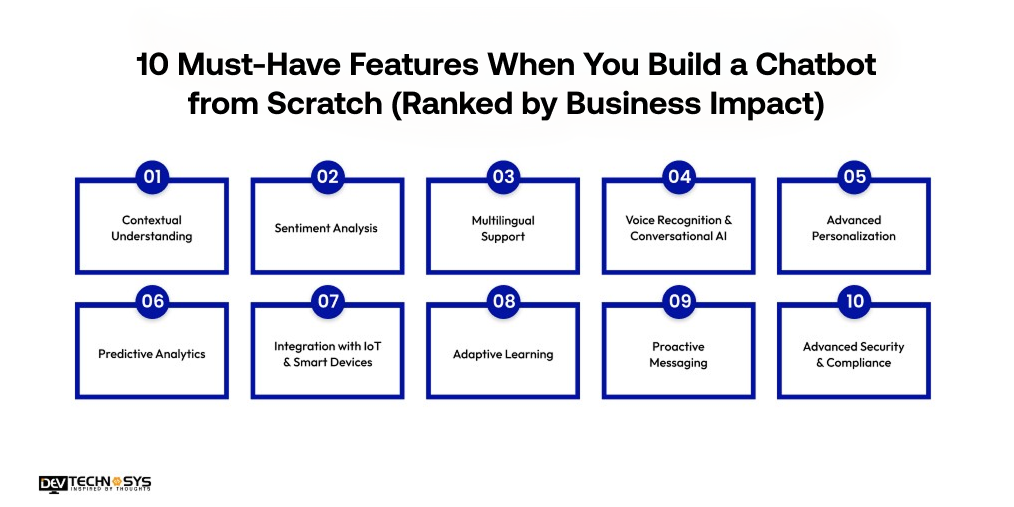
10 Must-Have Features When You Build a Chatbot from Scratch (Ranked by Business Impact)
Chatbot development process involves blending intelligent technology, user-focused chatbot architecture design, and seamless integrations. Key features like natural language understanding, nnatural language generation, conversation flow management, security, and multi-platform compatibility ensure it works efficiently and meets user expectations.
Core Functional Features |
Technical Requirements |
User Experience (UX) |
| NLP | Python | Simple Interface |
| Intent Recognition | JavaScript | Fast Response |
| Entity Extraction | Java | Personalization |
| Conversation Flow | TensorFlow | Clear CTAs |
| Multi-Platform Support | PyTorch | Error Handling |
| Human Handoff | Rasa | Smooth Navigation |
| Analytics & Reporting | spaCy | Intuitive Design |
| Chat History Management | MongoDB | Visual Feedback |
| Automated Responses | PostgreSQL | Quick Load Times |
| Context Awareness | API Integrations | Consistent Tone |
1. Contextual Understanding
Advanced chatbots remember previous conversations and user interactions. This allows them to provide relevant, context-aware responses, and maintain conversational continuity. They create a more human-like and personalized experience that feels natural and engaging over multiple sessions.
2. Sentiment Analysis
To develop a chatbot app like Grok or ChatGPT with sentiment analysis that can detect user emotions from text or voice. They adjust responses accordingly, address frustration, provide empathetic replies, or escalate issues when necessary. This improves user satisfaction, trust, and overall engagement with the AI assistant.
3. Multilingual Support
A multilingual chatbot communicates fluently in multiple languages. Multilingual chatbot solutions enables businesses to reach a global audience, provide customer support across regions, and ensures users feel understood in their preferred language, significantly boosting engagement and satisfaction.
4. Voice Recognition & Conversational AI
Voice-enabled chatbots allow users to interact via speech. They convert speech-to-text and text-to-speech, making hands-free communication possible.
Experts offering NLP development services in America will use this feature to enhances accessibility, convenience, and provides a more natural, human-like conversational experience across devices.
5. Advanced Personalization
Chatbots track user preferences, past interactions, and behavior patterns. They offer tailored recommendations, personalized offers, and relevant content. This creates a more engaging experience, strengthens customer relationships, and increases conversions by addressing individual user needs effectively.
6. Predictive Analytics
Predictive chatbots anticipate user needs by analyzing historical data and behavior patterns. They proactively suggest actions, reminders, or content, enhancing convenience, engagement, and business conversions by offering relevant guidance before users even ask for it.
7. Integration with IoT & Smart Devices
Smart chatbots can control IoT devices like smart home gadgets, wearables, and appliances. Users can issue commands, receive updates, and automate routines, creating seamless interactions between digital assistants and connected environments for improved user convenience.
8. Adaptive Learning
AI chatbots continuously learn from interactions and feedback. They refine response accuracy, understand new user intents, and adapt to changing trends, ensuring improved performance, better contextual understanding, and increasingly intelligent conversations over time.
9. Proactive Messaging
Proactive chatbots initiate conversations with reminders, notifications, or alerts without user prompts. This keeps users informed, improves engagement, encourages timely actions, and ensures users remain connected with services, promotions, or important updates seamlessly.
10. Advanced Security & Compliance
Chatbot development companies In USA develop top-tier chatbots by implementing end-to-end encryption, secure authentication, and regulatory compliance such as GDPR. They protect sensitive user data and ensure that conversations, transactions, and information exchanges are safe across all platforms.
You can reach out anytime; we are available 24/7. Our team provides a quick response.

5 Proven Business Reasons to Build Your Own Chatbot in 2026 (With ROI Data)
Investing in chatbot software helps businesses automate support, boost engagement, and improve customer satisfaction. AI-powered chatbots provide faster responses, gather insights, and create a seamless, personalized user experience.
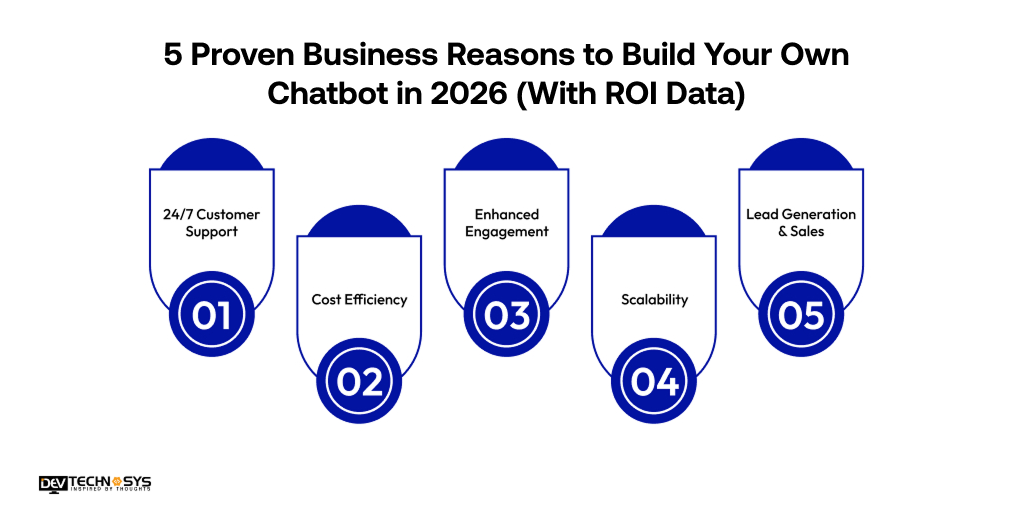
1. 24/7 Customer Support
Chatbots provide round-the-clock assistance, answering queries instantly. Customers get immediate solutions, reducing wait times and improving overall satisfaction. This constant availability strengthens trust and enhances the user experience significantly.
2. Cost Efficiency
Automating repetitive tasks allows businesses to save on staffing and operational costs. Chatbots handle multiple requests simultaneously, freeing human agents for complex tasks while maintaining efficiency and reducing overall MVP app development expenditure.
3. Enhanced Engagement
Personalized conversations and relevant recommendations keep users engaged. Chatbots maintain continuous interaction, respond in real-time, and deliver content tailored to individual preferences, increasing retention, satisfaction, and brand loyalty.
4. Scalability
Chatbots can manage multiple simultaneous conversations without performance issues. This scalability ensures businesses can handle growing user traffic efficiently, providing consistent service quality during peak hours or high-demand periods.
5. Lead Generation & Sales
AI chatbots guide users through products and services, answer queries, and suggest relevant items. By engaging users proactively, chatbots improve conversions, increase sales, and generate valuable leads for the business.
How Much Does It Cost to Build a Chatbot from Scratch in 2026? Full Budget Breakdown
The cost to develop a chatbot in USA ranges from $8,000 to $30,000, depending on factors like features, types, platform, design, and tech stack. The basic chatbot with standard functionalities will be around $8,000 to $15,000.
These chatbot for customer support are ideal for FAQs or simple assistance. Whereas, the cost to build a chatbot from scratch with advanced features and functionalities like advanced personalization, Voice Recognition, and Adaptive learning may nexceed to $30,000+.
Chatbot Type |
Estimated Cost (USD) |
| Basic Rule-Based Chatbot | $8,000 – $12,000 |
| Intermediate AI Chatbot | $12,000 – $20,000 |
| Advanced AI Chatbot | $20,000 – $30,000+ |
Ultimately, your chatbot cost depends on the desired functionality, scalability, and long-term maintenance needs. Various factors, such as features, platform, design, and developer location, influence the final budget. Let’s study these cost-affected factors in detail.
1. Feature Set
The number and complexity of features directly impact chatbot development costs. Advanced functionalities such as voice commands, personalization, conversational memory, sentiment analysis, and analytics dashboards require more development time, AI training, and backend integration, increasing both initial investment and ongoing maintenance requirements.
Feature |
Estimated Cost (USD) |
| Basic Features | $500 – $2,000 |
| Advanced Features | $2,000 – $6,000 |
| Premium Features | $6,000 – $10,000 |
2. Platform & Integration Needs
Deploying a chatbot across multiple platforms, web, mobile apps, WhatsApp, Messenger, adds complexity. Integrating third-party APIs, CRM systems, databases, or payment gateways requires extra development and testing effort, making multi-channel support more expensive but essential for broader accessibility and improved user experience.
Here’s the table showcasing the cost to build a chatbot from scratch basedon platform type.
Platform / Integration |
Estimated Cost (USD) |
| Single Platform | $700 – $2,500 |
| Multi-Platform | $1,500 – $5,000 |
| Integrations | $2,000 – $8,000 |
3. UI/UX Design
Custom, user-friendly chatbot UI/UX design enhances engagement and usability but increases costs. Crafting intuitive conversation flows, interactive elements, and visually appealing interfaces demands skilled designers and developers. High-quality UI/UX ensures users have smooth, enjoyable interactions, reducing drop-offs and improving adoption rates.
Design Type |
Estimated Cost (USD) |
| Basic Template | $1,000 – $3,000 |
| Custom UI | $4,000 – $8,000 |
| Premium UX | $8,000 – $11,500 |
4. Testing & Optimization
Comprehensive testing ensures the chatbot functions reliably and delivers accurate responses. Unit testing, integration checks, usability evaluations, and load testing identify issues and optimize performance. Thorough testing reduces errors, improves response quality, and extends the chatbot’s lifespan.
Testing Type |
Estimated Cost (USD) |
| Unit Testing | $800 – $1,000 |
| Integration Testing | $1,000 – $2,200 |
| Usability & Load Testing | $3,000 – $5,000 |
5. Maintenance & Updates
Ongoing maintenance is crucial for long-term performance. Tasks include updating AI models, adding features, scaling infrastructure, monitoring performance, and fixing bugs.
Continuous support ensures the chatbot remains accurate, relevant, and compatible with evolving platforms, contributing to recurring operational expenses beyond the initial launch.
Maintenance Type |
Estimated Cost (USD/Year) |
| Bug Fixes | $200 – $1,000 |
| Feature Updates | $500 – $2,000 |
| Scaling & Monitoring | $500 – $3,500 |
6. Development Team & Location
The cost of hiring a development team varies based on expertise and location. Experienced AI developers and designers charge higher rates, while offshore or freelance teams may reducethe cost to develop a chatbot. Team composition affects quality, speed, and project budget, making careful selection is crucial for efficient and cost-effective development.
Team Type / Location |
Estimated Cost (USD) |
| Local Freelancers | $8,000 – $12,000 |
| Experienced Local Team | $12,000 – $17,000 |
| Offshore Team | $15,000 – $20,000 |
How Long Does It Take to Build a Chatbot from Scratch? (Timeline by Type)
When you build a chatbot from scratch, the development timeline varies according to its type. Generally, it takes 3 to 6+ months based on complexity, features, and the type of chatbot. Simpler chatbots are built faster, while advanced ones take more time. Here, we have explained the timeline to build a chatbot according to types.
Chatbot Type |
Estimated Development Time |
Complexity Level |
Key Considerations |
| Rule-Based Chatbots | 3–4 months | Low | Simple logic, predefined responses, minimal AI integration |
| Menu/Button-Based Chatbots | 3–4 months | Low | Structured navigation, limited customization, fast deployment |
| AI-Powered Chatbots | 4–5+ months | Medium | Requires NLP, training data, and a continuous learning setup |
| Generative AI Chatbots | 5–6+ months | High | Advanced AI models, dynamic responses, and higher development effort |
| Voice Chatbots / Assistants | 5–6+ months | High | Speech recognition, voice processing, and real-time interaction |
| Hybrid Chatbots | 4–6+ months | Medium to High |
Combines rule-based logic with AI for flexible performance |

How to Make Money With a Chatbot: 5 Monetization Models for Business Owners
Intent recognition chatbots can be powerful revenue-generating tools when leveraged strategically. Businesses and developers can monetize chatbots through multiple methods, turning user interactions into profitable opportunities while improving customer experience and engagement.
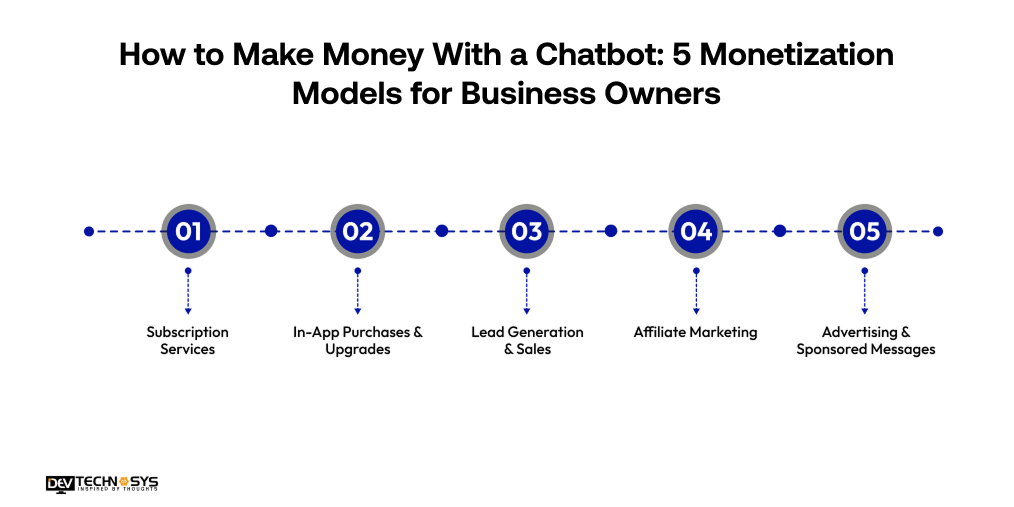
1. Subscription Services:
Offer premium chatbot features, advanced support, or exclusive content for a recurring fee. Users or businesses pay regularly for added value, enhancing engagement while generating predictable, long-term revenue streams. Subscription models work well for SaaS, education, or specialized service chatbots.
2. In-App Purchases & Upgrades:
In-app purchases enable users to buy add-ons, digital products, or enhanced chatbot capabilities within the interface. These purchases provide extra functionality, customization, or content access. This model increases revenue per user while keeping the core chatbot free and widely accessible.
3. Lead Generation & Sales:
Leverage the chatbot to collect qualified leads, guide users through products, and recommend relevant services. By automating lead capture and nurturing, businesses can increase conversion rates, drive sales, and turn user interactions into tangible revenue opportunities.
4. Affiliate Marketing:
Promote third-party products or services through affiliate links within chatbot conversations. Each successful referral earns a commission, creating a passive revenue stream. Intent recognition chatbot can suggest items contextually based on user behavior, increasing the likelihood of conversions.
5. Advertising & Sponsored Messages:
Integrate ads or sponsored content directly into chatbot interactions. Relevant promotions can be displayed seamlessly during conversations. This approach allows businesses to monetize engagement without interrupting the user experience, generating revenue from advertisers or partners.
5 Critical Mistakes to Avoid When You Build a Chatbot from Scratch
Strategic planning and continuous optimization are essential to prevent mistakes that can impact performance, user engagement, and overall satisfaction. Identifying common pitfalls early helps ensure smoother development and long-term success.
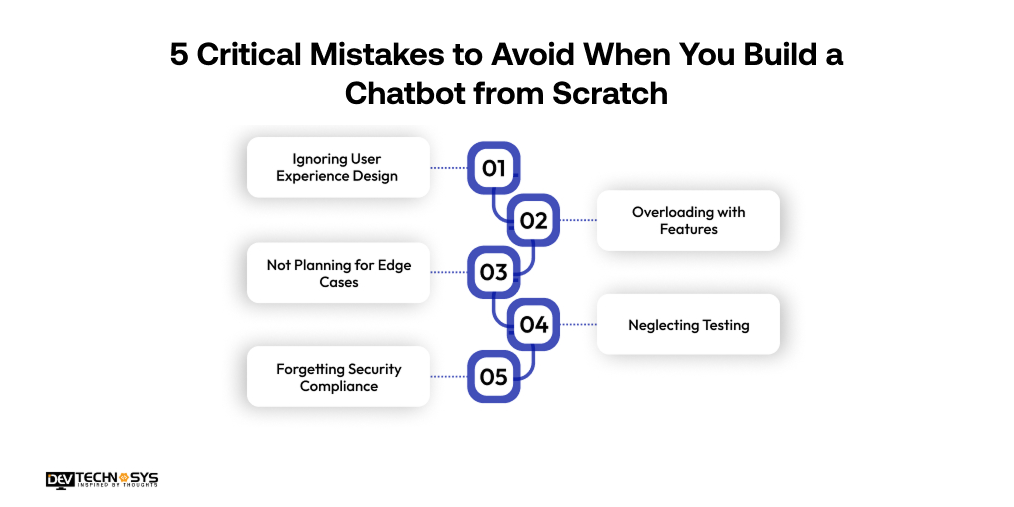
1. Ignoring User Experience Design:
A chatbot must deliver smooth, intuitive, and human-like conversations. Poorly structured dialogue, confusing navigation, or robotic responses can frustrate users quickly. According to a top AI chatbot development company in USA, prioritizing conversational design ensures higher engagement and improved overall satisfaction.
2. Overloading with Features:
Adding too many features during the initial development stage increases complexity, cost, and confusion. Focus on solving core problems first with a clear MVP strategy. Gradually enhance functionality based on analytics, feedback, and evolving business needs.
3. Not Planning for Edge Cases:
Users often ask unexpected or unclear questions. Without fallback responses, clarification prompts, and strong error handling, your chatbot may fail frequently. Preparing for edge cases improves reliability, strengthens trust, and enhances conversational continuity.
4. Neglecting Testing:
Skipping comprehensive testing can result in broken flows, inaccurate responses, and performance issues. Conduct unit, integration, usability, and load testing before launch. Continuous optimization ensures consistent performance and a seamless user experience.
5. Forgetting Security Compliance:
Failing to secure user data or comply with regulations can lead to serious legal and reputational risks. Implement encryption, authentication, and privacy standards from the beginning to protect sensitive information and build customer trust.
Conclusion: Start Building Your Chatbot from Scratch Today
Creating a chatbot from scratch requires careful planning, the right technology, and continuous optimization. By defining clear objectives, understanding your audience, and integrating advanced features, businesses can build chatbots that engage users, automate tasks, and deliver a seamless, personalized experience. If you wish to delove a next-gen chatbot like ChatGPT or Perplexity, then contact a top artificial intelligence development company in USA.
Frequently Asked Questions
Find answers to the most common questions related to this article.
NLP chatbot development guide begins with clarifying the chatbot’s objective. The initial step to build a chatbot is to decide whether it will provide customer support, generate leads, automate tasks, or engage users. A clear goal guides features, conversation design, and development strategy.
Choosing between a rule-based or AI chatbot depends on your requirements. Rule-based bots follow predefined scripts, while AI chatbots use natural language processing to deliver dynamic, human-like conversations, offering more flexibility and personalization.
Step1: Define Objective: Set chatbot purpose.
Step2: Choose Type: Rule-based or AI.
Step3: Design Flow: Map conversations.
Step4: Select Tech Stack: Pick languages & tools.
Step5: Develop & Train: Build backend, train AI.
Step6: Test & Optimize: Fix errors, improve UX.
Step 7: Deploy & Monitor: Launch and track performance.
A chatbot’s technology stack depends on its complexity and integrations. Common choices include Python, JavaScript, Node.js, AI frameworks, and NLP libraries. Proper selection ensures scalability, smooth operation, and seamless integration with third-party systems.
Testing involves unit, integration, usability, and load tests to ensure reliability and performance. Monitoring errors, fallback rates, and user feedback helps optimize conversations, improve accuracy, and deliver a smooth, efficient chatbot experience.
Chatbot development cost ranges from $8,000 for a basic rule-based bot to $30,000+ for AI-powered, multi-platform, enterprise-grade solutions. Costs to develop a chatbot from scratch vary depending on features, complexity, integrations, design, and long-term maintenance requirements.
The complexity and goals of the chatbot decide the programming language. Usually, Python is the most preferred language because of its robust AI and NLP libraries. However, JavaScript is the top choice for web-based chatbots. The solutions that are built on enterprise-level demands use of languages like Java or C#. Despite multiple languages with different purposes, Python remains the best programming language for flexible, scalable, and faster development.














